

Category
The conflicts in Iran and Ukraine have fundamentally changed what offensive cyber capability looks like. For organisations operating critical infrastructure, the implications are urgent and immediate.
There is a moment in the early hours of 28 February 2026 that will be studied by military strategists and cyber defenders for years to come. Before a single conventional weapon reached its target over Iranian airspace, the communications infrastructure that would have allowed Tehran to respond was already dark. Radar networks were blinded. Command-and-control nodes were severed. The kinetic strikes that followed were, in a meaningful sense, the second phase of the operation.
Cyber had gone first.
This is the new reality of state-level conflict, and it has profound implications not just for the military planners who must now treat digital and physical effects as a single integrated toolkit, but for every organisation operating critical infrastructure in a world where geopolitical fault lines shift with alarming speed.
At SOS Intelligence, we track the intersection of geopolitics and cyber operations as a core part of our mission. What follows is our assessment of what the current conflicts in Iran and Ukraine reveal about the maturation of offensive cyber capability, why telecommunications and critical infrastructure operators are now firmly in the crosshairs, and what practical action looks like when the threat environment escalates this rapidly.
The Integration of Cyber and Kinetic Operations
For much of the past two decades, cyber operations sat awkwardly alongside conventional military power. They were regarded as a niche capability, useful for intelligence collection or covert disruption, but difficult to integrate into fast-moving military campaigns. That view is now obsolete.
Three recent operations illustrate the shift with striking clarity.
Operation Midnight Hammer (Iran, 2025)
When the United States struck Iranian nuclear facilities in 2025, US Cyber Command was embedded within the strike package itself. General Dan Caine, Chairman of the Joint Chiefs of Staff, publicly credited cyber operations with enabling the precise timing and coordination that allowed all three nuclear sites to be hit within less than thirty minutes. The role of CYBERCOM was not ancillary. It was structural.
Operation Absolute Resolve (Venezuela, January 2026)
Preceding the Iran operations by only weeks, US forces conducted cyber operations in direct support of the military mission to detain Venezuelan President Nicolas Maduro. As special operations forces approached their objective, CYBERCOM reportedly disrupted the power supply to Caracas and degraded Venezuelan air defence radar and handheld communications. Lieutenant General William Hartman, acting CYBERCOM Director, described operations of this kind as a template for future conflicts: a model in which cyber capability is treated with the same operational seriousness as a precision-guided munition.
Operation Epic Fury (Iran, February 2026)

The most dramatic demonstration came with the US-Israeli strikes against Iranian military infrastructure on 28 February 2026. CYBERCOM and US Space Command were publicly identified as the first movers in the operation, deploying what officials termed ‘non-kinetic effects’ to neutralise Iranian communications and sensor networks ahead of physical strikes. Iran subsequently experienced a near-total internet blackout, with connectivity collapsing to approximately one per cent of normal levels according to internet monitoring organisation NetBlocks. Iranian government-aligned websites and news platforms were compromised. The BadeSaba religious calendar application, used by over five million Iranians, was seized and repurposed to display messages urging IRGC members to stand down.
“We have graduated to the point where we are treating a cyber capability just like we would a kinetic capability.”
— Lt General William Hartman, Acting Director, US Cyber Command
This is not rhetoric. It is doctrine. And it represents the consolidation of a trajectory that began with Stuxnet, the joint US-Israeli worm that quietly destroyed Iranian uranium centrifuges at Natanz between approximately 2007 and 2010 without firing a single shot. What was then an exceptional, deniable covert operation has become an openly acknowledged and institutionalised part of how the United States wages war.
Ukraine: The Proving Ground for a New Kind of Warfare
If the Iran operations represent the integration of cyber into precision military campaigns, Russia’s war in Ukraine has served as the largest real-world stress test of offensive and defensive cyber capability in history.
From the earliest days of the invasion in February 2022, Russian cyber operations preceded and accompanied kinetic strikes in ways that are now well documented. Wiper malware was deployed against Ukrainian government networks hours before tanks crossed the border. Satellite communications were targeted. Energy infrastructure, financial systems, and media organisations were subjected to sustained, destructive attacks. The intent was clear: to degrade Ukraine’s ability to coordinate, communicate, and resist.
What Russia’s campaign also demonstrated, however, was the limits of offensive cyber operations when the defending nation has invested seriously in resilience. Ukraine, supported by Western intelligence agencies including GCHQ and the US NSA, along with significant contributions from the private sector, proved far more resistant than Moscow anticipated. Networks were restored. Attacks were detected and mitigated. Ukrainian digital infrastructure, while battered, was never decisively broken.
The lessons are instructive in both directions. Offensive cyber operations can cause genuine disruption and real-world physical consequences. But a well-prepared defender, with strong monitoring, tested incident response capabilities, and robust international partnerships, can absorb and recover from significant attacks. The gap between prepared and unprepared organisations, in this environment, is vast.
ANALYST NOTE: THE RUSSIA PRECEDENT
Russia’s sustained cyber campaign against Ukraine has given Western threat intelligence teams an unprecedented corpus of observed TTPs, malware families, and infrastructure indicators. Groups including Sandworm (GRU-linked), APT29 (SVR-linked), and Gamaredon have been extensively documented throughout the conflict. The Ukrainian experience has effectively accelerated the global CTI community’s understanding of destructive cyber operations at scale.
For organisations operating in any sector assessed as critical national infrastructure, the Ukraine conflict is not merely a geopolitical event to monitor. It is an operational case study that directly informs defensive posture today.
The Iranian Cyber Ecosystem: Decentralised, Adaptive, and Dangerous
Understanding the Iranian cyber threat requires moving beyond the familiar mental model of a single, centralised APT actor. Iran’s offensive cyber capability is better understood as an ecosystem: a combination of state-directed intelligence services, IRGC-affiliated hacking units, and a broader layer of proxy hacktivist groups that operate under varying degrees of central direction and with significant operational autonomy.
Two primary state entities oversee this ecosystem. The Ministry of Intelligence and Security (MOIS) directs actors including APT34 (OilRig), APT39, MuddyWater, and the wiper-focused group Agrius. The Islamic Revolutionary Guard Corps (IRGC) oversees groups including APT33, APT35 (Charming Kitten), Cotton Sandstorm, and the OT-focused CyberAv3ngers.
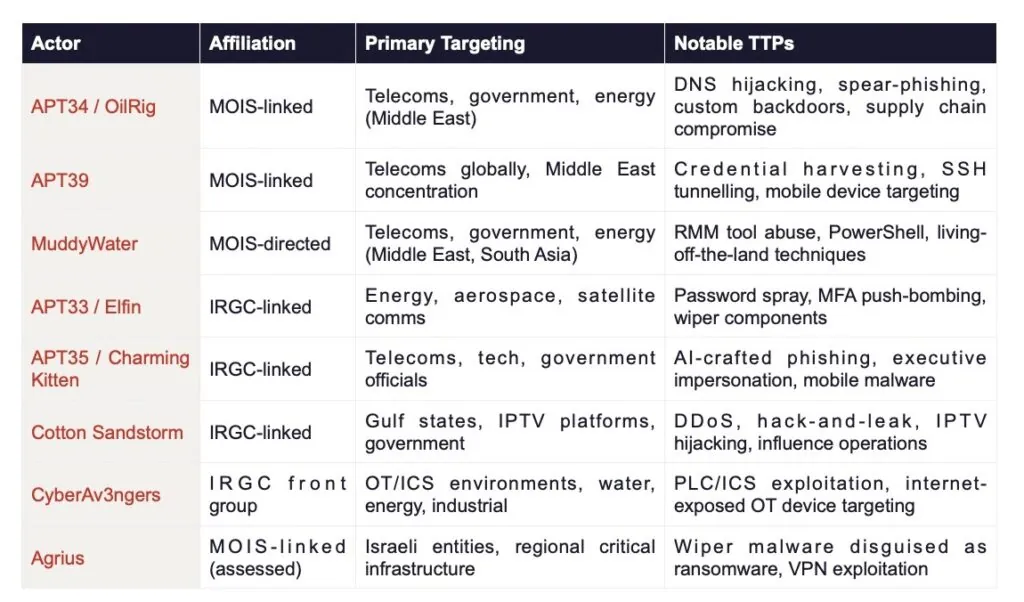
Sources: Mandiant/Google Cloud, CrowdStrike, Check Point Research, Picus Security, ReliaQuest, CISA.
Telecommunications infrastructure sits at the intersection of nearly all of these actors’ strategic interests. Subscriber data, call records, and messaging metadata are high-value intelligence collection targets. Disrupting telecoms networks degrades an adversary’s ability to coordinate. And compromised telecoms platforms can be weaponised for information operations, whether through push notifications, messaging manipulation, or the kind of streaming service hijacking that Cotton Sandstorm executed against UAE-based IPTV infrastructure.
The Decentralisation Risk
Operation Epic Fury introduced a new and significant complicating factor. With senior IRGC leadership killed in the strikes, the central command structure that ordinarily oversees and directs Iranian cyber operations has been substantially disrupted. Intelligence firm Flashpoint assessed the 48 to 72 hours immediately following the strikes as a period of extreme volatility, with hacktivist proxy groups likely to take the lead in escalation as they fill the vacuum left by Tehran’s disrupted command hierarchy.
This is a materially different threat dynamic. When proxy actors operate without formal oversight or strategic constraint, targeting decisions become opportunistic rather than carefully calibrated. Organisations that might not ordinarily feature on an Iranian APT group’s priority target list can find themselves in the crosshairs simply because they represent accessible infrastructure at a moment when lower-tier threat actors are competing to demonstrate relevance.
Observed post-Epic Fury activity already reflects this pattern. CrowdStrike confirmed it had identified reconnaissance and DDoS activity consistent with Iranian-aligned threat actors and hacktivist groups within hours of the operation. The ‘Great Epic’ cyber campaign, coordinated through Telegram’s Cyber Islamic Resistance channel, was activated and described by its organisers as their most aggressive deployment to date. Pro-Iranian group Handala claimed attacks in Jordan. Team 313 claimed a DDoS against a US social media platform. A group calling itself the Cyber Islamic Resistance Axis claimed to have accessed industrial control systems at an Israeli firm. Pro-Iranian actors also claimed to have breached the industrial control systems of a Jordanian grain silo company, allegedly manipulating temperature settings. The most significant development came on 11 March 2026, when Handala claimed a destructive wiper attack against global medical technology company Stryker, representing one of the most consequential Iranian-attributed cyber operations against a Western commercial target to date.
CASE STUDY: THE STRYKER ATTACK (11 MARCH 2026)
On 11 March 2026, Handala — a MOIS-linked hacktivist group assessed by Palo Alto Networks as a persona of Void Manticore — claimed responsibility for a destructive attack against Stryker, a Michigan-based medical device and technology company reporting $25 billion in annual revenues, with operations in 61 countries and products reaching over 150 million patients annually. Handala cited the Minab school strike of 28 February 2026, in which over 175 people, mostly children, were killed, as its motivation. Stryker’s acquisition of Israeli medical tech company OrthoSpace in 2019 and its $450 million US Department of Defense supply contract were also cited as grounds for targeting.
The attack vector is particularly notable. Rather than deploying traditional malware, Handala is assessed to have compromised Stryker’s Microsoft Intune environment — the cloud-based device management platform used by enterprise IT teams to enforce security policies and manage enrolled devices remotely. By gaining administrative access to Intune, the attackers were able to issue remote wipe commands across all enrolled endpoints simultaneously, bypassing conventional endpoint detection. The group claimed to have wiped over 200,000 systems, servers, and mobile devices, exfiltrated 50 terabytes of data, and forced the closure of Stryker offices across 79 countries. Over 5,000 employees at Stryker’s largest non-US hub in Cork, Ireland, were sent home. Employees reported that any personal device with Microsoft Outlook installed was also wiped.
The real-world consequences extended into healthcare. Maryland’s Institute for Emergency Medical Services reported Stryker’s Lifenet ECG transmission system was non-functional across most of the state. Hospitals reported being unable to order surgical supplies, with one senior healthcare professional describing it as a “real-world supply chain attack” affecting virtually every US hospital that performs surgery. Handala separately claimed a simultaneous attack against payments company Verifone, and the IRGC this week published an explicit list of US technology firms — including Google, Microsoft, and Nvidia — describing their regional infrastructure as legitimate targets. The Stryker attack represents a material escalation: wiper-class destructive capability, deployed by a decentralised proxy actor, against a non-traditional CNI target, with direct patient care implications.
SOS INTELLIGENCE ASSESSMENT
The current threat environment for organisations with critical national infrastructure status, particularly those with Middle East operational footprints, is assessed as HIGH. Iranian-aligned threat actors are conducting active reconnaissance and DDoS operations, with credible intelligence indicating these activities frequently serve as precursors to more destructive campaigns.
Gulf Cooperation Council states including the UAE, Bahrain, Qatar, and Saudi Arabia are explicitly identified across multiple threat intelligence sources as expected targets for disruptive Iranian cyberattacks, given their perceived alignment with the US-Israeli position and proximity to US military assets. A suspected Iranian attack drone struck RAF Akrotiri in Cyprus on 1 March 2026, indicating Iran’s willingness to target regional military infrastructure in Western jurisdictions. The cyber equivalents of such actions should be anticipated.
Why Telecoms Operators Are in the Crosshairs
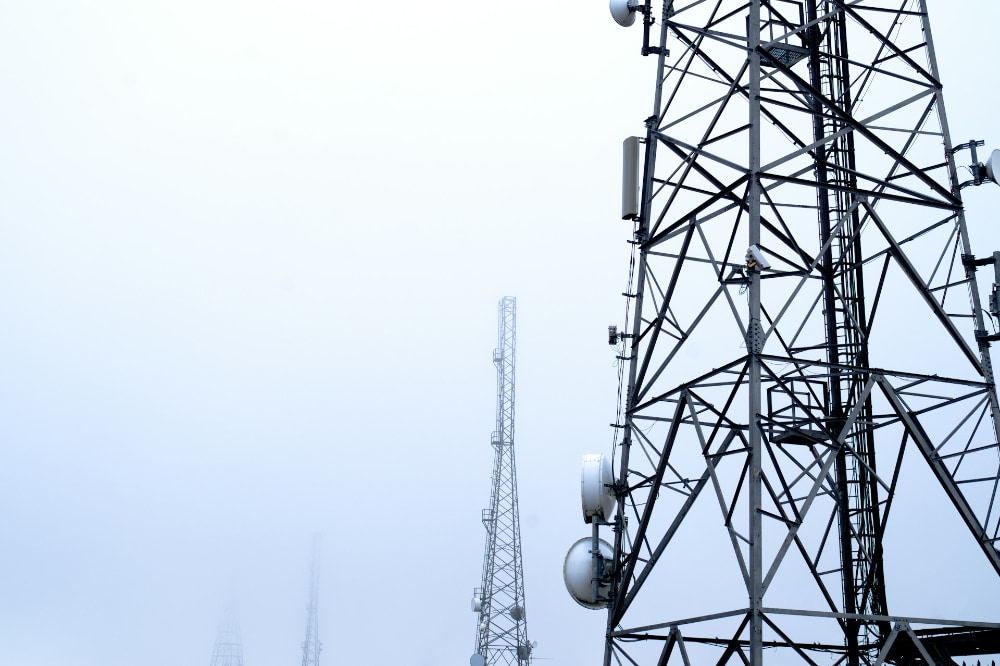
Telecommunications providers occupy a uniquely exposed position in the current threat landscape. They are simultaneously high-value intelligence collection targets, critical infrastructure whose disruption has cascading effects on other sectors, and platforms that can be compromised to amplify information operations.
For Iranian actors specifically, telecoms operators with Middle East presence represent a dual-use target. On one hand, access to subscriber data, call data records, and network metadata supports the surveillance of individuals of interest to Iranian intelligence services. On the other, disrupting telecoms infrastructure in GCC states serves the broader strategic objective of degrading the operational coordination of Iran’s adversaries in the region.
The tactics used to achieve initial access are well documented. Spear-phishing campaigns targeting telecoms employees and executives remain the most common entry point, with APT35 in particular deploying AI-crafted, highly contextualised phishing messages capable of deceiving even security-aware recipients. Internet-facing edge infrastructure, including VPN appliances and remote access portals, are systematically exploited by actors such as Fox Kitten (Pioneer Kitten), which specialises in this vector. MFA push-bombing and credential overload attacks have been observed against identity management systems. DNS hijacking, strongly associated with APT34 in telecoms campaigns, redirects legitimate traffic and can be extremely difficult to detect without dedicated DNS monitoring.
Once inside a network, Iranian actors have demonstrated a preference for living-off-the-land techniques: using legitimate administrative tools such as PowerShell and Remote Desktop Protocol to move laterally without triggering endpoint detection. Remote Monitoring and Management tools, including AnyDesk and SimpleHelp, have been abused to maintain persistent access. The Stryker attack has now added a further vector to this taxonomy: abuse of cloud-based device management platforms. By compromising Microsoft Intune administrative credentials, Handala was able to issue simultaneous remote wipe commands across all enrolled devices globally, turning an enterprise IT tool into a destructive weapon at scale. Any organisation relying on cloud-administered endpoint management should treat the administrative plane for those systems as a critical security boundary. The ultimate objectives of Iranian operations range from long-term quiet exfiltration of records to the deployment of wiper malware designed to cause irreversible destruction to network infrastructure.
The human dimension should not be underestimated. Beyond opportunistic SIM-swap fraud attacks targeting subscribers of Dubai-based operators observed within hours of the Iranian missile strikes on 1 March 2026, senior executives and board members are themselves targeted by APT35’s social engineering campaigns. High-trust impersonation via professional networks and AI-generated correspondence represents a threat that technical controls alone cannot fully address.
Critically, the Stryker attack demonstrates that Iranian proxy actors are no longer confining their destructive operations to sectors with an obvious geopolitical connection. Stryker had no direct involvement in the Iran conflict. It was targeted because of a historic Israeli business acquisition, a defence supply contract, and the opportunistic availability of a vulnerable attack surface. Organisations across healthcare, logistics, defence supply chains, and technology sectors should reassess their exposure accordingly. The IRGC’s explicit publication of a target list this week — naming Google, Microsoft, and Nvidia regional infrastructure as legitimate objectives — signals that the scope of acceptable targeting has broadened materially.
What This Means for Defenders
The synthesis of these threat streams points to a clear set of priorities for organisations seeking to navigate the current environment. The following represents SOS Intelligence’s distillation of the most important protective measures, structured by immediacy.
IMMEDIATE PRIORITY (0 TO 72 HOURS)
- Enrol in the NCSC Early Warning service if not already registered. The NCSC issued a formal advisory on 2 March 2026 identifying a heightened indirect cyber threat for organisations with Middle East presence or supply chains, with CNI operators specifically named.
- Escalate monitoring across Middle East-based network environments, with particular focus on authentication anomalies, unusual administrative tool activity, and lateral movement indicators consistent with MuddyWater, APT34, and Cotton Sandstorm TTPs.
- Verify that DDoS mitigation services are active, capacity-tested, and configured to handle traffic volumes consistent with current hacktivist campaign scale.
- Review the external attack surface for all Middle East entities: internet-facing VPNs, remote access portals, and public web applications represent the most frequently exploited initial access vectors.
- Confirm that incident response plans are current, exercised, and include a scenario-specific playbook for Iranian threat actor activity.
SHORT-TERM PRIORITY (ONE TO FOUR WEEKS)
- Conduct a targeted threat hunt for known Iranian APT indicators across relevant infrastructure, with particular focus on webshell presence, DNS anomalies, and RMM tool usage that cannot be attributed to authorised activity.
- Harden identity controls: enforce phishing-resistant MFA across all privileged access paths and eliminate any remaining legacy authentication protocols exposed to external access.
- Assess supply chain exposure by identifying IT and telecoms vendors operating in or through Iran-adjacent jurisdictions and reviewing the scope of third-party access permissions.
- Conduct a tabletop exercise simulating a wiper malware attack against regional infrastructure to validate backup integrity and test recovery time objectives under realistic conditions.
- Brief board members and senior leadership specifically on AI-crafted spear-phishing risks associated with APT35. Technical controls and awareness training must work in parallel.
- Audit and harden cloud administration plane access, with specific attention to Microsoft Intune, Microsoft Entra ID, and any platform capable of issuing remote commands to enrolled endpoints. The Stryker attack demonstrates that compromise of a cloud device management console can deliver wiper-class destructive capability at global scale without deploying a single piece of malware. Privileged administrative accounts for these platforms should be treated as tier-zero assets: phishing-resistant MFA enforced, access scoped and logged, and anomalous administrative activity alerted in real time.
ONGOING MONITORING
- Treat each kinetic escalation event in the Iran conflict as a likely precursor to a corresponding increase in cyber activity within 24 to 72 hours. Threat posture should be reviewed and adjusted dynamically rather than on a fixed cycle.
- Monitor OT/ICS security for any telecoms infrastructure with operational technology components, given CyberAv3ngers’ sustained focus on internet-exposed industrial systems in the Gulf region.
- Monitor for SIM-swap fraud attempts against regional subscribers, given confirmed attacks in the UAE in the immediate aftermath of the 1 March 2026 missile strikes.
- Consider engaging a specialist threat intelligence provider with Middle East APT coverage if in-house visibility into this threat landscape is limited.
Conclusion: The Age of Integrated Conflict
The conflicts unfolding in Iran and Ukraine are not background noise for cybersecurity professionals. They are the operational environment in which we now work. The integration of cyber effects into kinetic military campaigns, the activation of decentralised hacktivist networks in the wake of disrupted command structures, and the explicit targeting of critical national infrastructure including telecommunications are not theoretical risks. They are observable, documented, and escalating.
What has changed most profoundly is the speed of the threat cycle. The period between a geopolitical event and a corresponding cyber operation is now measured in hours. Organisations that maintain static threat postures calibrated to last month’s intelligence are already behind.
Resilience in this environment is not a one-time project. It is a continuous operational discipline. The defenders who will weather the current storm are those who treat threat intelligence as a real-time operational input, who have invested in tested detection and response capabilities before they were needed, and who understand that in the age of integrated conflict, the network perimeter and the geopolitical map are increasingly the same thing.
SOS Intelligence will continue to track and report on developments in this rapidly evolving threat landscape. Subscribers to our Early Warning service will receive updates as significant events and indicators emerge.
Sources & References
This analysis draws on open-source intelligence including the NCSC Advisory of 2 March 2026, statements from CrowdStrike, Flashpoint, Mandiant/Google Cloud, Check Point Research, and Picus Security, as well as publicly reported congressional testimony and official US Department of Defense statements. The 13 March 2026 update incorporates reporting from KrebsOnSecurity, CNN, TechCrunch, Bloomberg, the Irish Examiner, Al Jazeera, and Palo Alto Networks Unit 42 on the Stryker attack and associated Iranian cyber activity. All intelligence reflects information available as at 13 March 2026.
Tehran Photo by Sajad Nori on Unsplash.
Telecoms Photo by David Arrowsmith on Unsplash








Recent Comments